Plan in HTML
Status: ShippedSome stories are easier to explain with a flow diagram, a table of acceptance criteria or a rollout plan than with plain text. CodeSense lets any story, or an epic’s main doc, be an HTML page. The app renders the page as it is and reads the story’s fields from <meta> tags in its head.
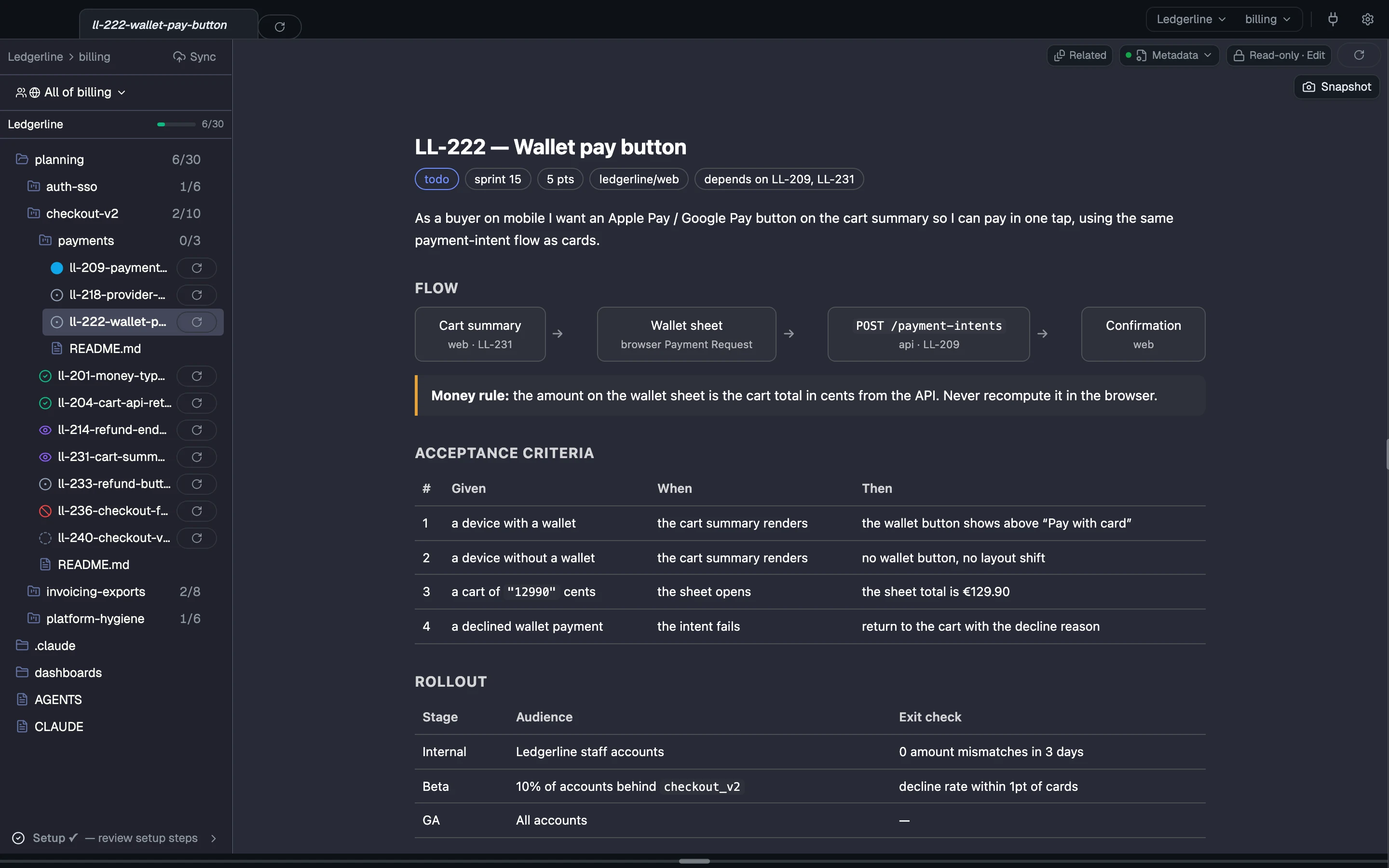
This guide builds LL-222, the wallet pay button from the Ledgerline sample’s payments sub-epic.
1. Create the page
Save an .html file in the epic folder, next to the markdown stories:
billing/content/planning/checkout-v2/payments/ll-222-wallet-pay-button.html2. Add the cs: meta tags
Put one <meta name="cs:…"> tag in the <head> for each field. The names are the markdown keys with dashes in place of underscores:
<!doctype html><html lang="en"><head> <meta charset="utf-8"> <meta name="cs:type" content="story"> <meta name="cs:story-id" content="LL-222"> <meta name="cs:status" content="todo"> <meta name="cs:source-repo" content="ledgerline/web"> <meta name="cs:depends-on" content="LL-209, LL-231"> <meta name="cs:sprint" content="sprint-15"> <meta name="cs:points" content="5"> <meta name="cs:assigned-to" content="sam"> <meta name="cs:tags" content="payments, ui, wallets"> <title>LL-222 — Wallet pay button</title></head>| Markdown key | Meta name |
|---|---|
type | cs:type |
story_id | cs:story-id |
status | cs:status |
source_repo | cs:source-repo |
depends_on | cs:depends-on |
assigned_to | cs:assigned-to |
sprint, points, tags | cs:sprint, cs:points, cs:tags |
The same rules apply as for markdown:
cs:typemust bestory,bugorspike.cs:source-repomust name a repo on your team’s list.- List values such as
cs:depends-onandcs:tagsare comma-separated. - A page with no
cs:meta tags at all is an ordinary HTML doc, not a story.
The full mapping is in Story and epic fields.
The story’s title comes from <title>, or from the first <h1> if there’s no title.
3. Mark the summary
CodeSense reads a story’s summary from a marked section. In HTML, wrap it in a section named like the markdown heading:
<section data-cs="story"> <p>As a buyer on mobile I want an Apple Pay / Google Pay button on the cart summary so I can pay in one tap, using the same payment-intent flow as cards.</p></section>The rest of the body is yours: styles, diagrams, tables. The page renders exactly as written.
4. Open it
Open the file in the app. It renders as a live page, with the story’s metadata band above it. Every HTML page in your spaces gets full web capabilities and the allowlisted set of CodeSense commands, with no prompt.
5. Change its status
Set LL-222’s status from its status icon in the left nav or from the metadata band. CodeSense rewrites the cs:status tag in place and leaves the rest of the file alone. If a tag is missing, it’s added to the <head>.
HTML epics
An epic’s main doc can be README.html or index.html. The epic’s repos list goes in <meta name="cs:repos" content="ledgerline/web, ledgerline/api">.
How we know this is accurate 6 sources
Checked against the app at 1b3d5a69d73473db077dfb44f4390b42cded6bd4.
Feature inventory
-
B-1 -
B-2
Code
-
src-tauri/src/commands/pipeline_format/html.rs -
src-tauri/src/commands/pipeline_format/mod.rs -
src-tauri/src/commands/pipeline_scanner.rs -
src/features/dashboard/components/html-viewer.tsx